
Your notes, written.Your audio, never uploaded.
notavik records the visit, tells clinician from patient, and drafts a structured note you can edit and paste into any chart. Transcription and drafting happen on the device in front of you — not in someone else's data centre.
Start at no cost — 10 visits a month, no account
Good morning, what brings you in today?
00:00I've had a sore throat and a fever since Friday.
00:04I took ibuprofen last night and it helped a little.
00:11Drafted on device
Subjective
Patient presents with sore throat and fever since Friday. Reports pain on swallowing, denies cough. Self-managed with ibuprofen last night with mild relief.
Consent
Patient consent obtained for recording.
audio uploaded
contacts, in total
or passwords
backup you make
Apple's own App Privacy label for notavik reads Data Not Collected
001
Every other AI scribe uploads the visit.
The ambient documentation category is built on the same assumption: the microphone is in the room, the intelligence is in a data centre. The recording of your patient — their voice, their symptoms, their history — travels to a vendor's servers, gets processed, and is retained under a policy you agreed to but did not write.
That architecture is why those products need enterprise contracts, business associate agreements, procurement review and a monthly rental measured in three figures. Every one of those things exists to manage a risk that only appears once the audio leaves the room.
notavik does not create that risk. The speech model and the note model both run on your device's neural engine. The recording is written to encrypted storage there and stays there. There is no server to breach, no account to compromise, and no retention policy to read, because there is nothing on our side to retain.
002
One visit, start to chart.
Three taps between the patient leaving and the note being ready to paste.
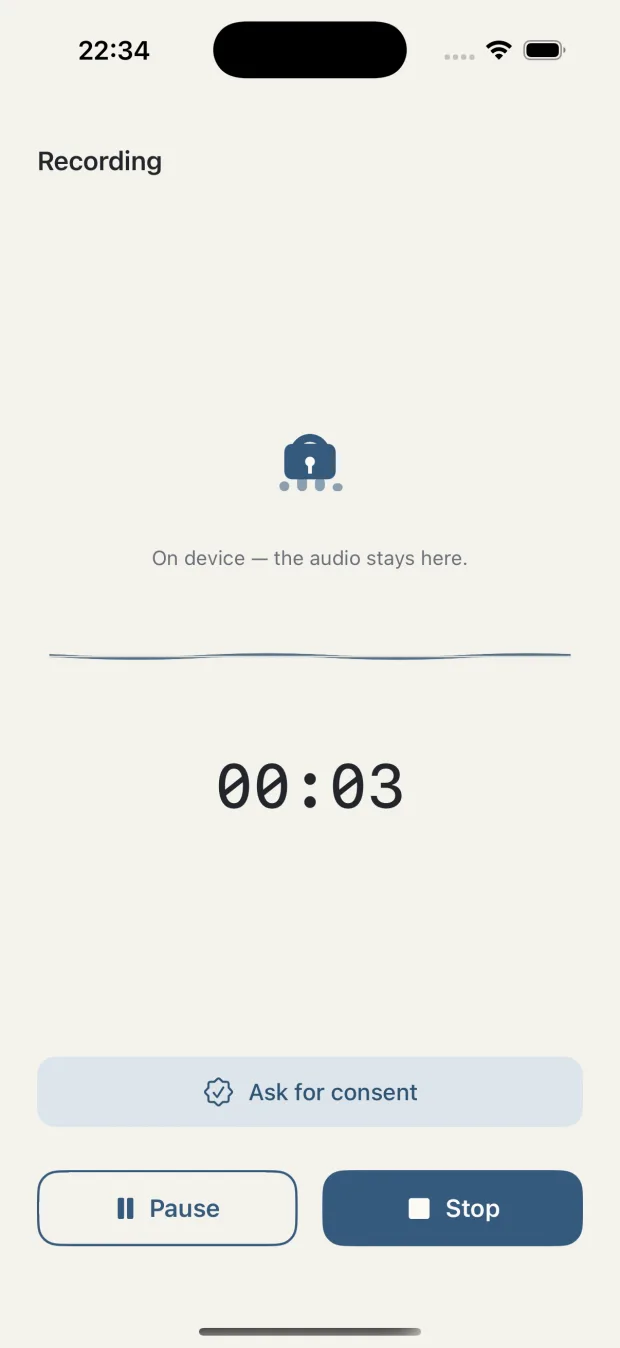
Record
Tap once at the start of the visit. Recording continues with the screen locked and the device in your pocket. A one-tap script helps you ask for consent, and the answer is written into the note.
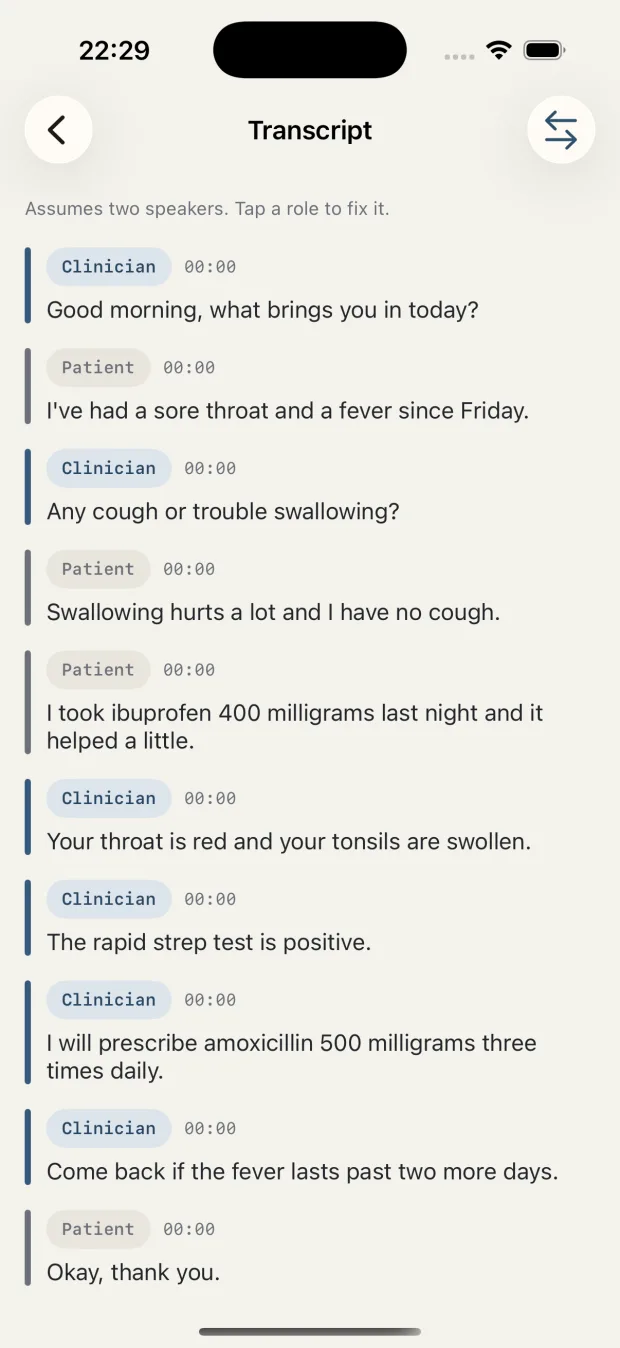
Read the transcript
The visit comes back as a timestamped transcript with clinician and patient separated into roles. Any role label is one tap to correct.
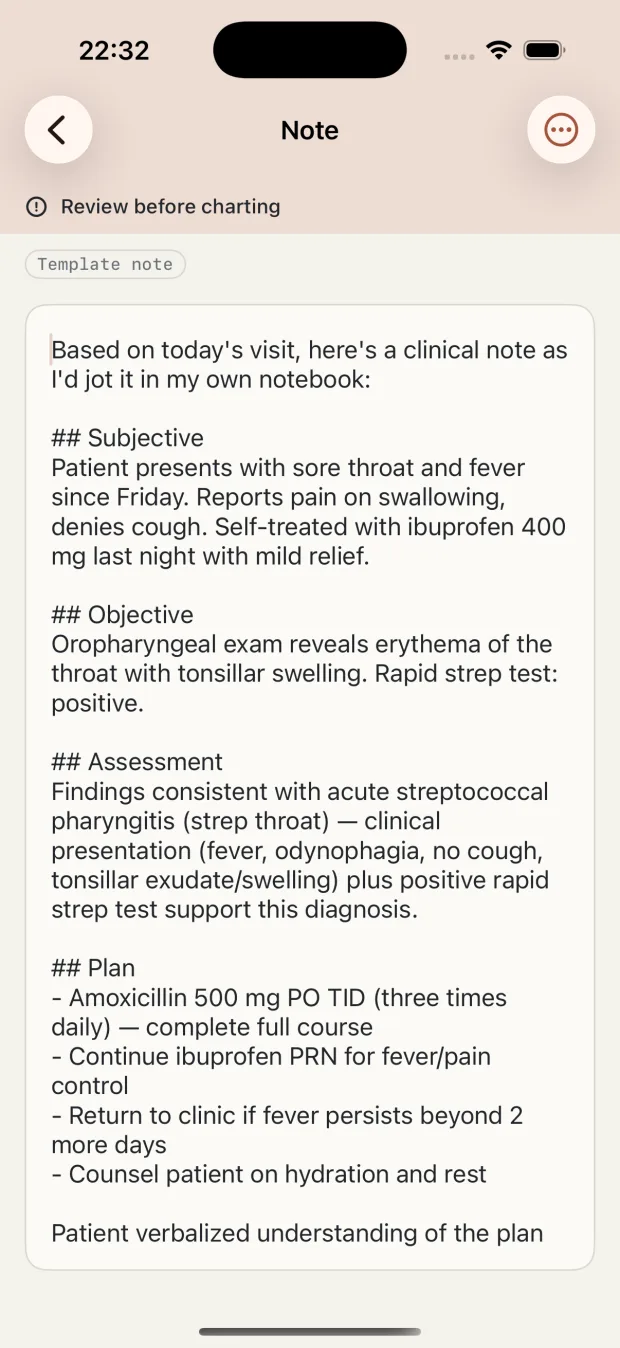
Take the note
A SOAP or narrative draft is built from what was actually said. Edit it, then copy it, export a PDF, or send it through the share sheet into whatever you chart in.
The note is a draft and the app says so on every screen that shows one. notavik extracts what was said in the room; it never writes a finding into the note that nobody mentioned. You read it before it goes in the chart.
003
Everything this app sends, in full.
Not a summary. Not the highlights. This is the complete list of destinations notavik contacts, and it is short enough to print.
There is no fourth row. notavik has no analytics SDK, no crash reporter, no advertising identifier and no account system. You can check this without taking our word for it: record a visit with the network off, or read the app's entry in Settings → Privacy & Security → App Privacy Report on iPhone or iPad.
Encrypted with the device
Recordings, transcripts and notes are protected by the operating system's file encryption, so they are unreadable while the device is locked. You can add Face ID or Touch ID on top of the app itself.
Audio deletes itself
Recordings are removed automatically after 30 days by default, or after 7, 90, or never if you prefer. Deleting audio never touches the note or transcript.
One tap erases the visit
If a patient changes their mind mid-consultation, one tap stops the recording and permanently deletes the audio, the transcript and the note together.
No cloud means no safety net
Lose the device and you lose the notes. That is the trade, and we would rather state it than bury it. notavik writes a password-protected backup file you save yourself — we never hold a copy.
004
Don't take our word for it.
A privacy promise you cannot test is just marketing. Both of these take about a minute, and neither one needs us.
Cut the network and keep working
- Install notavik and let it finish its one-time model download.
- Turn on airplane mode, or switch off Wi-Fi and mobile data.
- Record a full visit, read the transcript, generate the note.
Everything works. Nothing could have been uploaded, because there was nothing to upload it over.
Read what the app actually contacted
- On iPhone or iPad, open Settings → Privacy & Security.
- Turn on App Privacy Report and use notavik for a week.
- Come back and look at the domains listed under notavik.
You will see the App Store, RevenueCat, and the model download. That is the whole list — the same three rows we printed above.
What it is built on
No proprietary black box. The components are named, published and checkable, which is the only kind of technical claim worth making.
005
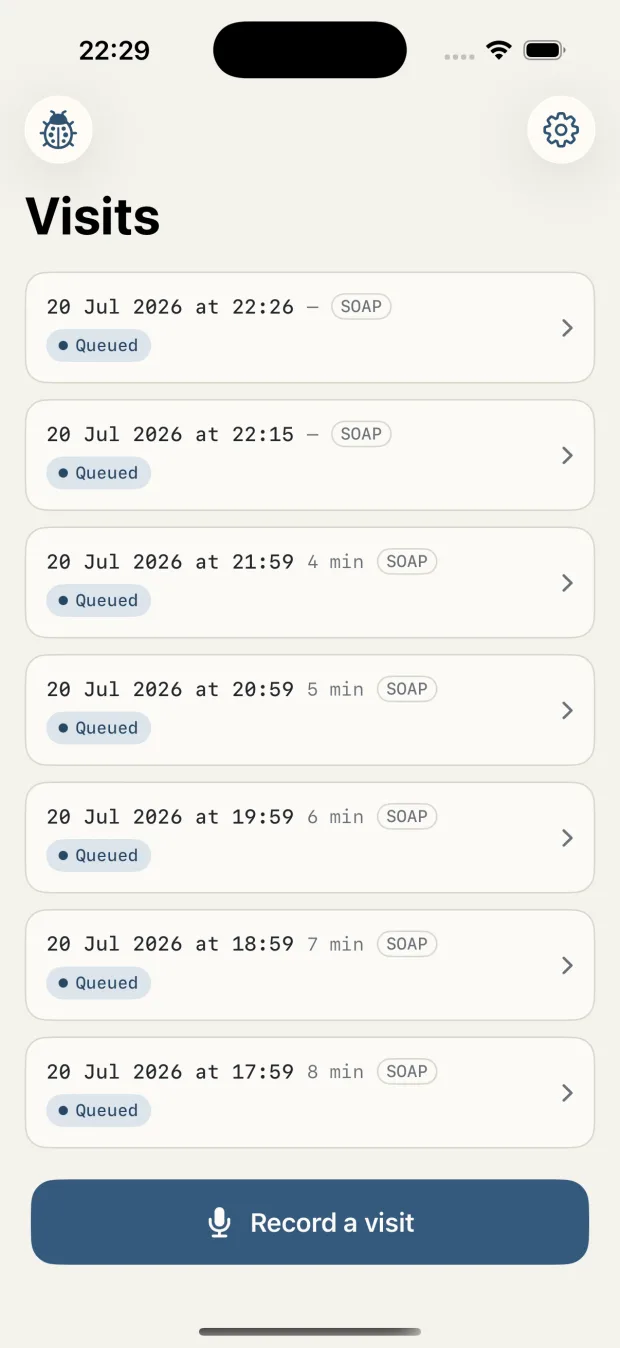
Built for the ninety seconds between patients.
Quiet, fast, and legible at arm's length. No dashboards, no streaks, nothing that needs learning.
006
Where the visit actually goes.
The comparison that matters is not feature counts. It is one question: does the recording of your patient leave the room?
| notavik | Cloud AI scribes (Abridge, Nabla, Freed, Heidi, DAX) |
|
|---|---|---|
| Where the audio is processed | On your device | On the vendor's servers |
| Who holds a copy of the recording | Only you | You and the vendor |
| Account required | No | Yes |
| Works with no internet | Yes, after the first launch | No |
| Business associate agreement needed | No vendor in the chain | Yes — the vendor handles the data |
| Pricing model | Free tier, subscription, or one-time purchase | Monthly subscription or enterprise contract |
| Works with your EHR | Any — you paste the note | Varies; some are tied to specific systems |
Based on those vendors' publicly documented architecture as of July 2026. Several are excellent products built for health systems with procurement teams and signed agreements — a setting notavik is not designed for. Heidi's Remote feature captures audio on the device, but the note is still generated in the cloud. If you need EHR integration or an enterprise contract, one of them is the right answer, not this.
007
No server to rent you.
Cloud scribes charge monthly because every visit costs them compute. Ours costs us nothing, so we can sell the app instead of renting it back to you.
$4.99 / week
For a locum week or a trial run at your own pace.
- Unlimited visits
- Cancel anytime
$29.99 / year
Starts with a free trial. Cancel before it ends and you pay nothing.
- Unlimited visits
- Free trial
- Cancel anytime
$99.99 once
A one-time purchase. It does not renew, and there is nothing to cancel.
- Unlimited visits, permanently
- No subscription
Prices shown in US dollars; your App Store shows the price in your own currency. One purchase covers iPhone, iPad and Mac. Subscriptions are billed through your Apple ID and renew automatically unless cancelled at least 24 hours before the period ends. Manage or cancel anytime in your App Store account settings.
008
What notavik is not.
It documents, it does not decide
notavik is a documentation tool. It writes down what was said in the room and structures it. Every clinical judgement in the note is yours, and you review the draft before it reaches the chart.
Clinician and patient only
Speaker separation is fixed at two roles. A third person in the room gets folded into one of them. Tap any label to correct it.
Copy and paste, by design
There is no EHR connection and nothing is filed automatically. You move the note across yourself, which is also why it works with every system.
iPhone, iPad and Mac
notavik needs Apple's on-device neural engine: iOS or iPadOS 17 or later, or a Mac with Apple silicon. One purchase covers all three. There is no Android app and no web version.
009
Straight answers.
Does the audio really stay on my device?
Yes. Recording, transcription, speaker separation and note drafting all run on the device. No network path in the app carries recorded audio, a transcript or a note anywhere. You can verify it yourself: turn on airplane mode after the first launch and record a full visit — everything still works. Apple's own App Privacy Report will show you what the app contacts.
Are my recordings used to train AI models?
No, and they could not be. Your recordings, transcripts and notes never reach us, so there is nothing of yours for us or anyone else to train on. The speech and note models ship with the app already trained and do not learn from your visits. No training on patient data happens locally either.
Does notavik need an internet connection?
Only once. On first launch the app downloads its speech models from the Hugging Face CDN, roughly 1.5 GB over Wi-Fi. After that it runs fully offline. The only other network the app uses is Apple's App Store for purchases.
Do I need to create an account?
No. There is no sign-up, no login and no server. Nothing to register, nothing to breach, and no account to delete later. Your notes are on your device and nowhere else.
Is notavik HIPAA compliant?
notavik is designed to support your HIPAA and GDPR obligations rather than to carry a compliance badge. HIPAA compliance describes a covered entity and its business associates, not an app. Because notavik has no server and never receives your recordings, we are not a business associate and there is no vendor in your data chain to sign a BAA with. The recordings stay on hardware you already control and secure under your own policies.
Which EHR does it work with?
All of them, indirectly. notavik does not connect to any EHR. You copy the finished note, export it as a PDF, or send it through the share sheet, and paste it wherever you chart. Nothing is ever sent to an EHR automatically.
How many speakers can it separate?
Two — clinician and patient. This is fixed, not estimated. A third voice in the room, such as a family member or an interpreter, gets folded into one of the two roles. You can correct any role label by tapping it in the transcript.
What does it cost?
The free tier covers 10 visits a month with every note feature included. Pro removes the monthly limit for $4.99 a week or $29.99 a year with a free trial, and there is a $99.99 one-time lifetime purchase that never renews. Prices are shown in US dollars; your local App Store price may differ.
Why is it so much cheaper than other AI scribes?
Because there is no server. Cloud scribes pay for transcription and language-model compute on every visit, and that recurring cost becomes your monthly rental. notavik runs on hardware you already own, so the marginal cost of your thousandth visit is zero. That is also why a one-time purchase is an honest offer here and not a promotion.
What happens to my notes if my subscription lapses?
Nothing. Every note you have already created stays viewable, editable and exportable — after a lapse, a refund, or a cancellation. The subscription only governs how many new visits you can record in a month.
What if I lose my device?
You lose the data, and we would rather say that plainly than pretend otherwise. There is no cloud copy because a cloud copy is exactly what the product refuses to make. notavik ships a password-protected backup file that you save yourself through the share sheet, and your notes are protected by the operating system's file encryption while the device is locked.
Do I need to tell the patient they are being recorded?
That is your call and your legal obligation, and it depends on where you practise — several US states require all-party consent, and the GDPR applies across the EU. notavik gives you a one-tap consent script to read, records whether consent was asked and given, and writes that marker into the note. If the patient withdraws mid-visit, one tap stops the recording and deletes the visit completely. The app assists your documentation; it does not give legal advice.
Which devices and languages are supported?
notavik runs on iPhone, iPad and Mac, and one purchase covers all three through Apple's Universal Purchase. It requires iOS or iPadOS 17 or later, or a Mac with Apple silicon. The interface is available in English and German, and the speech engine handles visits in both. There is no Android version and no web version.
Write tonight's notes before you leave the room.
Ten visits a month, free, with nothing to sign up for. If it does not earn its place in your day by the tenth, you have lost nothing but the download.
iPhone, iPad and Mac · one purchase covers all three · English and German